
使用 Express 框架 的專案
將 app.js 的程式碼換成以下的
const express = require('express');
const app = express();
const http = require('http');
const server = http.createServer(app);
app.get('/', (req, res) => {
res.sendFile(__dirname + '/index.html');
});
server.listen(3000, () => {
console.log('listening on *:3000');
});
將 index.html 從 public 拉出來,然後刪除 public 資料夾
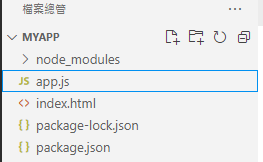
將 index.html 修改成以下的程式碼
<!DOCTYPE html>
<html>
<head>
<title>Socket.IO chat</title>
<style>
body { margin: 0; padding-bottom: 3rem; font-family: -apple-system, BlinkMacSystemFont, "Segoe UI", Roboto, Helvetica, Arial, sans-serif; }
#form { background: rgba(0, 0, 0, 0.15); padding: 0.25rem; position: fixed; bottom: 0; left: 0; right: 0; display: flex; height: 3rem; box-sizing: border-box; backdrop-filter: blur(10px); }
#input { border: none; padding: 0 1rem; flex-grow: 1; border-radius: 2rem; margin: 0.25rem; }
#input:focus { outline: none; }
#form > button { background: #333; border: none; padding: 0 1rem; margin: 0.25rem; border-radius: 3px; outline: none; color: #fff; }
#messages { list-style-type: none; margin: 0; padding: 0; }
#messages > li { padding: 0.5rem 1rem; }
#messages > li:nth-child(odd) { background: #efefef; }
</style>
</head>
<body>
<ul id="messages"></ul>
<form id="form" action="">
<input id="input" autocomplete="off" /><button>Send</button>
</form>
</body>
</html>
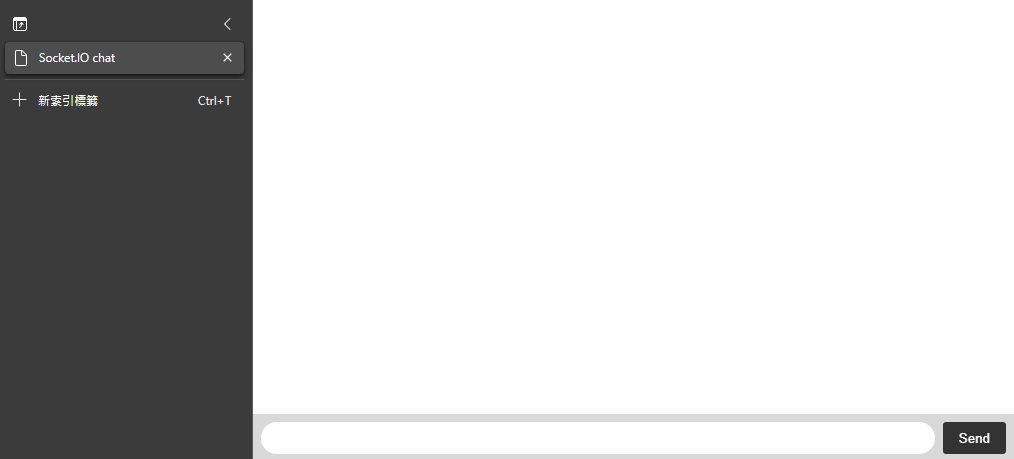
進入網址 http://localhost:3000
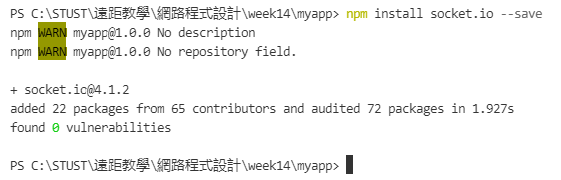
開啟 VSCODE 的終端機,安裝 socket.io
npm install socket.io --save
使用者連線事件
將 app.js 替換成以下程式碼
const express = require('express');
const app = express();
const http = require('http');
const server = http.createServer(app);
const { Server } = require("socket.io");
const io = new Server(server);
app.get('/', (req, res) => {
res.sendFile(__dirname + '/index.html');
});
io.on('connection', (socket) => {
console.log('a user connected');
});
server.listen(3000, () => {
console.log('listening on *:3000');
});
將 index.html 替換成以下程式碼
<!DOCTYPE html>
<html>
<head>
<title>Socket.IO chat</title>
<style>
body {
margin: 0;
padding-bottom: 3rem;
font-family: -apple-system, BlinkMacSystemFont, "Segoe UI", Roboto, Helvetica, Arial, sans-serif;
}
#form {
background: rgba(0, 0, 0, 0.15);
padding: 0.25rem;
position: fixed;
bottom: 0;
left: 0;
right: 0;
display: flex;
height: 3rem;
box-sizing: border-box;
backdrop-filter: blur(10px);
}
#input {
border: none;
padding: 0 1rem;
flex-grow: 1;
border-radius: 2rem;
margin: 0.25rem;
}
#input:focus {
outline: none;
}
#form>button {
background: #333;
border: none;
padding: 0 1rem;
margin: 0.25rem;
border-radius: 3px;
outline: none;
color: #fff;
}
#messages {
list-style-type: none;
margin: 0;
padding: 0;
}
#messages>li {
padding: 0.5rem 1rem;
}
#messages>li:nth-child(odd) {
background: #efefef;
}
</style>
</head>
<body>
<ul id="messages"></ul>
<form id="form" action="">
<input id="input" autocomplete="off" /><button>Send</button>
</form>
<script src="/socket.io/socket.io.js"></script>
<script>
var socket = io();
</script>
</body>
</html>
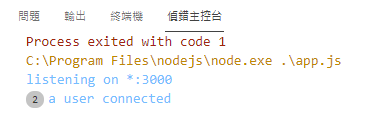
將伺服器跑起來,並且進入 http://localhost:3000,可以看到伺服器有新增使用者了
使用者離線事件
將 app.js 替換成以下程式碼
const express = require('express');
const app = express();
const http = require('http');
const server = http.createServer(app);
const { Server } = require("socket.io");
const io = new Server(server);
app.get('/', (req, res) => {
res.sendFile(__dirname + '/index.html');
});
io.on('connection', (socket) => {
console.log('a user connected');
socket.on('disconnect', () => {
console.log('user disconnected');
});
});
server.listen(3000, () => {
console.log('listening on *:3000');
});
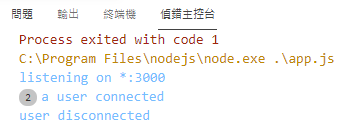
關閉一個頁面就可以看到一個使用者已經離線
發送訊息的事件
將 index.html 替換成以下的程式碼
<!DOCTYPE html>
<html>
<head>
<title>Socket.IO chat</title>
<style>
body {
margin: 0;
padding-bottom: 3rem;
font-family: -apple-system, BlinkMacSystemFont, "Segoe UI", Roboto, Helvetica, Arial, sans-serif;
}
#form {
background: rgba(0, 0, 0, 0.15);
padding: 0.25rem;
position: fixed;
bottom: 0;
left: 0;
right: 0;
display: flex;
height: 3rem;
box-sizing: border-box;
backdrop-filter: blur(10px);
}
#input {
border: none;
padding: 0 1rem;
flex-grow: 1;
border-radius: 2rem;
margin: 0.25rem;
}
#input:focus {
outline: none;
}
#form>button {
background: #333;
border: none;
padding: 0 1rem;
margin: 0.25rem;
border-radius: 3px;
outline: none;
color: #fff;
}
#messages {
list-style-type: none;
margin: 0;
padding: 0;
}
#messages>li {
padding: 0.5rem 1rem;
}
#messages>li:nth-child(odd) {
background: #efefef;
}
</style>
</head>
<body>
<ul id="messages"></ul>
<form id="form" action="">
<input id="input" autocomplete="off" /><button>Send</button>
</form>
<script src="/socket.io/socket.io.js"></script>
<script>
var socket = io();
var form = document.getElementById('form');
var input = document.getElementById('input');
form.addEventListener('submit', function (e) {
e.preventDefault();
if (input.value) {
socket.emit('chat message', input.value);
input.value = '';
}
});
</script>
</body>
</html>
再將 app.js 替換成以下程式碼
const express = require('express');
const app = express();
const http = require('http');
const server = http.createServer(app);
const { Server } = require("socket.io");
const io = new Server(server);
app.get('/', (req, res) => {
res.sendFile(__dirname + '/index.html');
});
io.on('connection', (socket) => {
console.log('a user connected');
socket.on('disconnect', () => {
console.log('user disconnected');
});
socket.on('chat message', (msg) => {
console.log('message: ' + msg);
});
});
server.listen(3000, () => {
console.log('listening on *:3000');
});
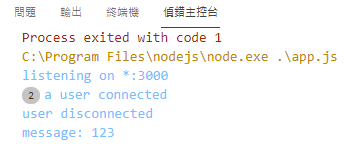
重新啟動伺服器,並且在網頁中送出訊息,即可在伺服器端看到訊息
轉送給聊天室其他用戶
將 index.html 替換成以下程式碼
<!DOCTYPE html>
<html>
<head>
<title>Socket.IO chat</title>
<style>
body {
margin: 0;
padding-bottom: 3rem;
font-family: -apple-system, BlinkMacSystemFont, "Segoe UI", Roboto, Helvetica, Arial, sans-serif;
}
#form {
background: rgba(0, 0, 0, 0.15);
padding: 0.25rem;
position: fixed;
bottom: 0;
left: 0;
right: 0;
display: flex;
height: 3rem;
box-sizing: border-box;
backdrop-filter: blur(10px);
}
#input {
border: none;
padding: 0 1rem;
flex-grow: 1;
border-radius: 2rem;
margin: 0.25rem;
}
#input:focus {
outline: none;
}
#form>button {
background: #333;
border: none;
padding: 0 1rem;
margin: 0.25rem;
border-radius: 3px;
outline: none;
color: #fff;
}
#messages {
list-style-type: none;
margin: 0;
padding: 0;
}
#messages>li {
padding: 0.5rem 1rem;
}
#messages>li:nth-child(odd) {
background: #efefef;
}
</style>
</head>
<body>
<ul id="messages"></ul>
<form id="form" action="">
<input id="input" autocomplete="off" /><button>Send</button>
</form>
<script src="/socket.io/socket.io.js"></script>
<script>
var socket = io();
var messages = document.getElementById('messages');
var form = document.getElementById('form');
var input = document.getElementById('input');
form.addEventListener('submit', function (e) {
e.preventDefault();
if (input.value) {
socket.emit('chat message', input.value);
input.value = '';
}
});
socket.on('chat message', function (msg) {
var item = document.createElement('li');
item.textContent = msg;
messages.appendChild(item);
window.scrollTo(0, document.body.scrollHeight);
});
</script>
</body>
</html>
將 app.js 替換成以下程式碼
const express = require('express');
const app = express();
const http = require('http');
const server = http.createServer(app);
const { Server } = require("socket.io");
const io = new Server(server);
app.get('/', (req, res) => {
res.sendFile(__dirname + '/index.html');
});
io.on('connection', (socket) => {
console.log('a user connected');
socket.on('disconnect', () => {
console.log('user disconnected');
});
socket.on('chat message', (msg) => {
io.emit('chat message', msg);
});
});
server.listen(3000, () => {
console.log('listening on *:3000');
});
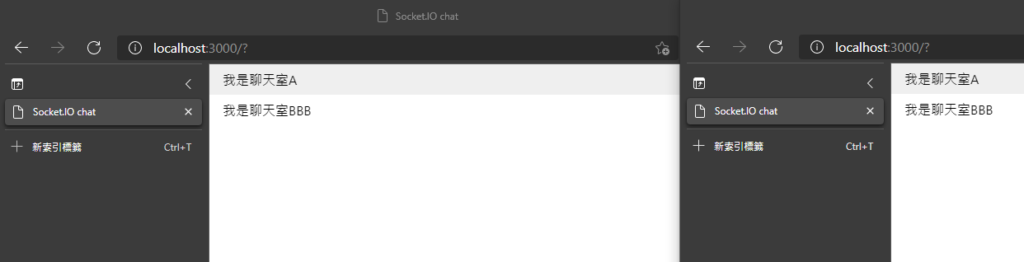
重新啟動伺服器,同時開啟兩個網頁 http://localhost:3000

資工系所碩二畢
-
車牌回來了
但是現在汽門漏氣,維修ing...
-
車牌回來了
但是現在汽門漏氣,維修ing...
Latest posts by SHXJ (see all)
- 受保護的內容: NAS 版 Mathbot 管理網站與 Linebot 啟動方法 - 2024 年 11 月 15 日
- Realtime 啥鬼的 - 2021 年 6 月 15 日
- nodejs 數學遊戲 - 2021 年 6 月 8 日