
前置準備
請先把 pominglee 的鏡像站偷回來: 取得 pominglee 鏡像站
或是從校外把鏡像站偷回來: 取得校外鏡像站
開始自幹
0. 進入 root 權限
su -1. 安裝 apache2 伺服器套件
apt-get install -y apache22. 輸入以下指令確認伺服器已經啟用 (綠色 active 表示正常運作)
/etc/init.d/apache2 status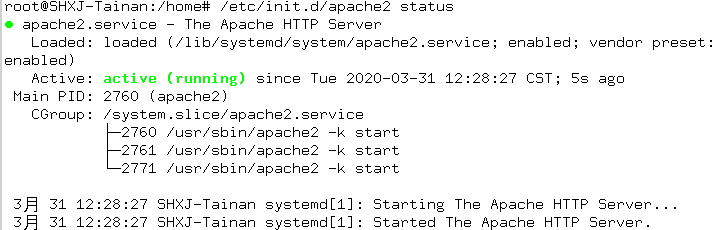
3. 編輯 apache2.conf 檔案
nano /etc/apache2/apache2.conf4. 找到 <Directory /var/www/> 這個段落結束處新增以下段落
<Directory /home/ftp/>
Options Indexes FollowSymLinks
AllowOverride None
Require all granted
</Directory>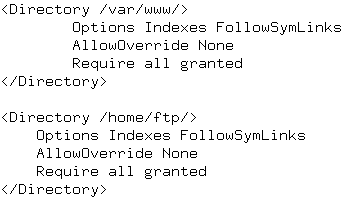
5. 編輯 000-default.conf 檔案
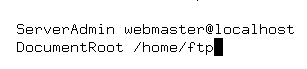
nano /etc/apache2/sites-available/000-default.conf6. 找到 DocumentRoot /var/www/html 處
改成
DocumentRoot /home/ftp
7. 重新啟動 apache2 伺服器
/etc/init.d/apache2 restart8. 編輯 sources.list
nano /etc/apt/sources.list9. 在最上面加入以下的鏡像站
deb http://127.0.0.1/debian/ buster main contrib non-free10. 輸入指令確定可以自幹鏡像站
apt-get update
資工系所碩二畢
-
車牌回來了
但是現在汽門漏氣,維修ing...
-
車牌回來了
但是現在汽門漏氣,維修ing...
Latest posts by SHXJ (see all)
- 受保護的內容: NAS 版 Mathbot 管理網站與 Linebot 啟動方法 - 2024 年 11 月 15 日
- Realtime 啥鬼的 - 2021 年 6 月 15 日
- nodejs 數學遊戲 - 2021 年 6 月 8 日
在〈架設自幹鏡像站〉中有 1 則留言