
新增一个专案,名称 SimpleTable

点击 Main.storyboard,新增一个 Table View

把这个 Table view 填满整个萤幕

把 Prototype Cells 设定为 1

点一下第一个储存格

把 style 选择 Basic

Identifier 设定为 datacell

选取 Table view,点击下面的 Add New Constraints,并将四条红线选起来,按下 Add 4 Constrains

点击 ViewController.swift,将表格的协定加上去

按下 Fix 他就会帮我们把方法加进来

就像这样

在第 12 行新增餐厅的名称,并且返回菜单总数(第十四行)
//
//  ViewController.swift
//  SimpleTable
//
//  Created by SHXJ on 2020/10/8.
//  Copyright © 2020 SHXJ. All rights reserved.
//

import UIKit

class ViewController: UIViewController, UITableViewDataSource {
    var restarantNames = ["Cafe Deaned", "Homei", "Teakha"]
    func tableView(_ tableView: UITableView, numberOfRowsInSection section: Int) -> Int {
        return restarantNames.count
    }

    func tableView(_ tableView: UITableView, cellForRowAt indexPath: IndexPath) -> UITableViewCell {

    }


    override func viewDidLoad() {
        super.viewDidLoad()
        // Do any additional setup after loading the view.
    }


}
找到储存格物件并且设定显示内容(第十八行到第二十二行)
//
//  ViewController.swift
//  SimpleTable
//
//  Created by SHXJ on 2020/10/8.
//  Copyright © 2020 SHXJ. All rights reserved.
//

import UIKit

class ViewController: UIViewController, UITableViewDataSource {
    var restarantNames = ["Cafe Deaned", "Homei", "Teakha"]
    func tableView(_ tableView: UITableView, numberOfRowsInSection section: Int) -> Int {
        return restarantNames.count
    }

    func tableView(_ tableView: UITableView, cellForRowAt indexPath: IndexPath) -> UITableViewCell {
        let cellIdentifier = "datacell"
        let cell = tableView.dequeueReusableCell(withIdentifier: cellIdentifier, for: indexPath)
        cell.textLabel?.text = restarantNames[indexPath.row]

        return cell
    }


    override func viewDidLoad() {
        super.viewDidLoad()
        // Do any additional setup after loading the view.
    }


}
到 Main.storyboard ,对着 TableView 按下滑鼠右键

接着按照动画将两个东西拉进去
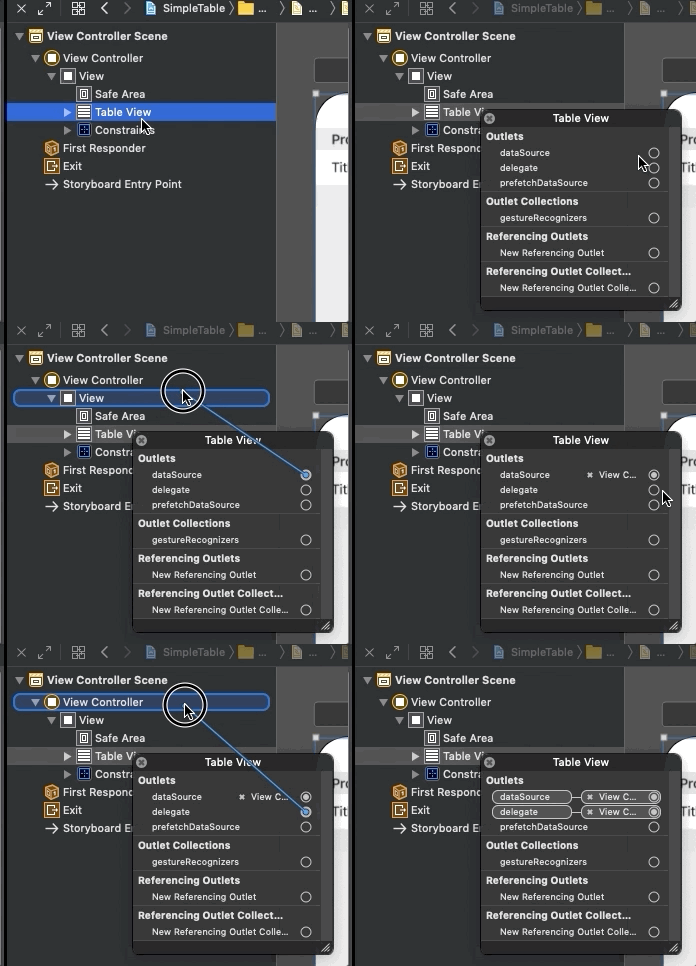
按下模拟器,画面上有出现所有餐厅的名字就成功惹


资工系所硕二毕
-
车牌回来了
但是现在汽门漏气,维修ing...
-
车牌回来了
但是现在汽门漏气,维修ing...
Latest posts by SHXJ (see all)
- 受保护的内容: NAS 版 Mathbot 管理网站与 Linebot 启动方法 - 2024 年 11 月 15 日
- Realtime 啥鬼的 - 2021 年 6 月 15 日
- nodejs 数学游戏 - 2021 年 6 月 8 日
在〈范例表格程式〉中有 1 则留言