
开启专案,新增一个 Swift File
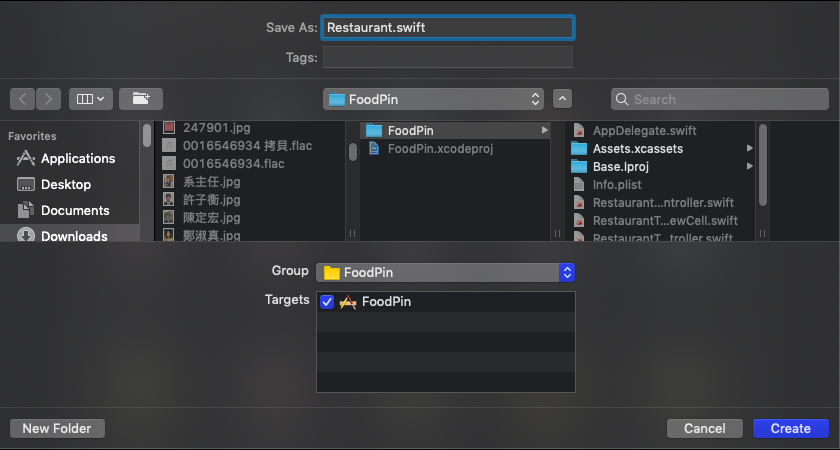
覆蓋以下程式码
//
//  Restaurant.swift
//  FoodPin
//
//  Created by SHXJ on 2020/11/26.
//  Copyright © 2020 AppCoda. All rights reserved.
//

import Foundation
class Restaurant{
    var name: String
    var type: String
    var location: String
    var image: String
    var isVisited: Bool

    init(name: String, type:String, location:String, image:String, isVisited:Bool){
        self.name = name;
        self.type = type;
        self.location = location;
        self.image = image;
        self.isVisited = isVisited
    }

    convenience init(){
        self.init(name:"", type:"", location:"", image:"", isVisited:false)
    }
}
更新 RestaurantTableViewController.swift 的程式码为以下
//
//  RestaurantTableViewController.swift
//  FoodPin
//
//  Created by Simon Ng on 28/10/2019.
//  Copyright © 2019 AppCoda. All rights reserved.
//

import UIKit

class RestaurantTableViewController: UITableViewController {

    var restaurant: [Restaurant] = [
        Restaurant(name: "Cafe Deadend", type: "Hong Kong", location: "Hong Kong", image: "cafedeadend", isVisited: false),
        Restaurant(name: "Homei", type: "Cafe", location: "Hong Kong", image: "homei", isVisited: false),
        Restaurant(name: "Teakha", type: "Tea House", location: "Hong Kong", image: "teakha", isVisited: false),
        Restaurant(name: "Cafe Loisl", type: "Austrian / Causual Drink", location: "Hong Kong", image: "cafeloisl", isVisited: false),
        Restaurant(name: "Petite Oyster", type: "French", location: "Hong Kong", image: "petiteoyster", isVisited: false)
    ]


    override func viewDidLoad() {
        super.viewDidLoad()

        tableView.cellLayoutMarginsFollowReadableWidth = true

        // Set to use the large title of the navigation bar
        navigationController?.navigationBar.prefersLargeTitles = true
    }

    // MARK: - Table view data source

    override func numberOfSections(in tableView: UITableView) -> Int {
        return 1
    }

    override func tableView(_ tableView: UITableView, numberOfRowsInSection section: Int) -> Int {
        return restaurant.count
    }


    override func tableView(_ tableView: UITableView, cellForRowAt indexPath: IndexPath) -> UITableViewCell {

        let cellIdentifier = "datacell"
        let cell = tableView.dequeueReusableCell(withIdentifier: cellIdentifier, for: indexPath) as! RestaurantTableViewCell

        // Configure the cell...
        cell.nameLabel.text = restaurant[indexPath.row].name
        cell.locationLabel.text = restaurant[indexPath.row].location
        cell.typeLabel.text = restaurant[indexPath.row].type
        cell.thumbnailImageView.image = UIImage(named: restaurant[indexPath.row].image)

        // Solution to exercise 2
        cell.heartImageView.isHidden = !self.restaurant[indexPath.row].isVisited

        return cell
    }

    override func tableView(_ tableView: UITableView, trailingSwipeActionsConfigurationForRowAt indexPath: IndexPath) -> UISwipeActionsConfiguration? {
        let deleteAction = UIContextualAction(style: .destructive, title: "Delete") { (action, sourceView, completionHandler) in
            // Delete the row from the data source
            self.restaurant.remove(at: indexPath.row)


            self.tableView.deleteRows(at: [indexPath], with: .fade)

            // Call completion handler with true to indicate
            completionHandler(true)
        }

        let shareAction = UIContextualAction(style: .normal, title: "Share") { (action, sourceView, completionHandler) in
            let defaultText = "Just checking in at " + self.restaurant[indexPath.row].name

            let activityController: UIActivityViewController

            if let imageToShare = UIImage(named: self.restaurant[indexPath.row].image) {
                activityController = UIActivityViewController(activityItems: [defaultText, imageToShare], applicationActivities: nil)
            } else  {
                activityController = UIActivityViewController(activityItems: [defaultText], applicationActivities: nil)
            }

            // For iPad
            if let popoverController = activityController.popoverPresentationController {
                if let cell = tableView.cellForRow(at: indexPath) {
                    popoverController.sourceView = cell
                    popoverController.sourceRect = cell.bounds
                }
            }

            self.present(activityController, animated: true, completion: nil)
            completionHandler(true)
        }

        // Customize the color
        deleteAction.backgroundColor = UIColor(red: 231.0/255.0, green: 76.0/255.0, blue: 60.0/255.0, alpha: 1.0)
        deleteAction.image = UIImage(systemName: "trash")

        shareAction.backgroundColor = UIColor(red: 254.0/255.0, green: 149.0/255.0, blue: 38.0/255.0, alpha: 1.0)
        shareAction.image = UIImage(systemName: "square.and.arrow.up")

        let swipeConfiguration = UISwipeActionsConfiguration(actions: [deleteAction, shareAction])

        return swipeConfiguration
    }

    override func tableView(_ tableView: UITableView, leadingSwipeActionsConfigurationForRowAt indexPath: IndexPath) -> UISwipeActionsConfiguration? {

        let checkInAction = UIContextualAction(style: .normal, title: "Check-in") { (action, sourceView, completionHandler) in

            let cell = tableView.cellForRow(at: indexPath) as! RestaurantTableViewCell
            self.restaurant[indexPath.row].isVisited = (self.restaurant[indexPath.row].isVisited) ? false : true
            cell.heartImageView.isHidden = self.restaurant[indexPath.row].isVisited ? false : true

            completionHandler(true)
        }

        let checkInIcon = restaurant[indexPath.row].isVisited ? "arrow.uturn.left" : "checkmark"
        checkInAction.backgroundColor = UIColor(red: 38.0/255.0, green: 162.0/255.0, blue: 78.0/255.0, alpha: 1.0)
        checkInAction.image = UIImage(systemName: checkInIcon)

        let swipeConfiguration = UISwipeActionsConfiguration(actions: [checkInAction])


        return swipeConfiguration
    }


    // MARK: - Navigation

    override func prepare(for segue: UIStoryboardSegue, sender: Any?) {
        if segue.identifier == "showRestaurantDetail" {
            if let indexPath = tableView.indexPathForSelectedRow {
                let destinationController = segue.destination as! RestaurantDetailViewController
                destinationController.restaurant = restaurant[indexPath.row]
            }
        }
    }


}
更新 RestaurantDetailViewController.swift 程式码为以下
//
//  RestaurantDetailViewController.swift
//  FoodPin
//
//  Created by Simon Ng on 28/10/2019.
//  Copyright © 2019 AppCoda. All rights reserved.
//

import UIKit

class RestaurantDetailViewController: UIViewController {

    @IBOutlet var restaurantImageView: UIImageView!
    @IBOutlet var restaurantNameLabel: UILabel!
    @IBOutlet var restaurantTypeLabel: UILabel!
    @IBOutlet var restaurantLocationLabel: UILabel!

    var restaurant = Restaurant()

    var restaurantImageName = ""
    var restaurantName = ""
    var restaurantType = ""
    var restaurantLocation = ""

    override func viewDidLoad() {
        super.viewDidLoad()

        restaurantNameLabel.text = restaurant.name
        restaurantTypeLabel.text = restaurant.type
        restaurantLocationLabel.text = restaurant.location
        restaurantImageView.image = UIImage(named: restaurant.image)
    }


    /*
    // MARK: - Navigation

    // In a storyboard-based application, you will often want to do a little preparation before navigation
    override func prepare(for segue: UIStoryboardSegue, sender: Any?) {
        // Get the new view controller using segue.destination.
        // Pass the selected object to the new view controller.
    }
    */

}

资工系所硕二毕
-
车牌回来了
但是现在汽门漏气,维修ing...
-
车牌回来了
但是现在汽门漏气,维修ing...
Latest posts by SHXJ (see all)
- 受保护的内容: NAS 版 Mathbot 管理网站与 Linebot 启动方法 - 2024 年 11 月 15 日
- Realtime 啥鬼的 - 2021 年 6 月 15 日
- nodejs 数学游戏 - 2021 年 6 月 8 日