
建立一個會講話的 APP
MIT App Inventor 2
http://ai2.appinventor.mit.edu/
首先建立一個專案
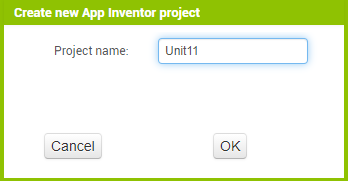
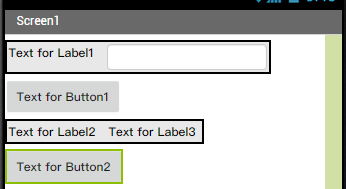
畫面上放入兩個 HorizontalArrangement
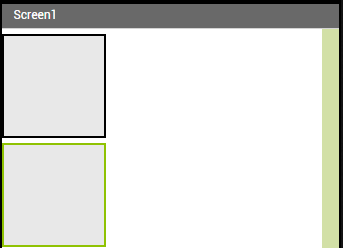
第一個格子放入一個 Label 以及一個 TextBox
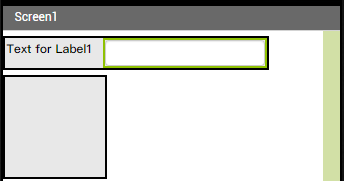
放入一個 Button 在兩個格子中間
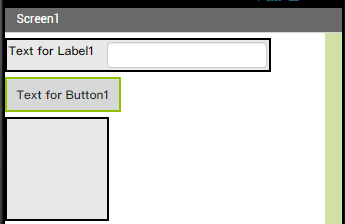
放入兩個 Label 到第二個格子,然後放一個 Button 到最後面
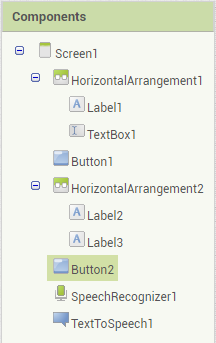
放入 Media 底下的 SpeechRecognizer 以及 TextToSpeech

將第一個格子、TextBox1、Button1、第二個格子、Button2 的寬度 (Width) 都改為 Fill parent
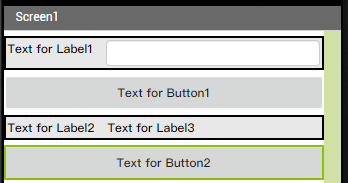
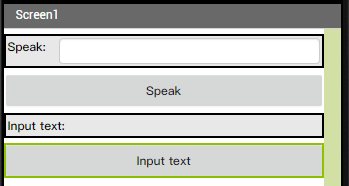
Label1 的文字改為 Speak:、Button1 的文字改為 Speak、Label2 的文字改為 Input text
Label3 的文字改為 空白、Button2 的文字改為 Input text
元件結構
Blocks / 程式碼部分
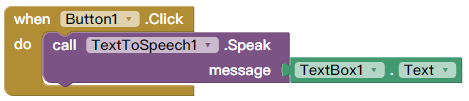
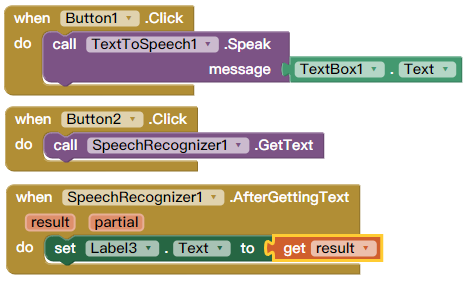
放入一個 when Button1.Click do call TextSpeech1.Speak message 到畫面上

message 的部分放入 TextBox1.Text
放入一個 when Button2.Click do call SpeechRecognizer1.GetText

放入一個 when SpeechRecognizer1.AfetrGettingText do set Label3.Text to get result
手機安裝畫面
範例檔案下載:點我下載

資工系所碩二畢
-
車牌回來了
但是現在汽門漏氣,維修ing...
-
車牌回來了
但是現在汽門漏氣,維修ing...
Latest posts by SHXJ (see all)
- 受保護的內容: NAS 版 Mathbot 管理網站與 Linebot 啟動方法 - 2024 年 11 月 15 日
- Realtime 啥鬼的 - 2021 年 6 月 15 日
- nodejs 數學遊戲 - 2021 年 6 月 8 日