
建立一个专案目录 week15
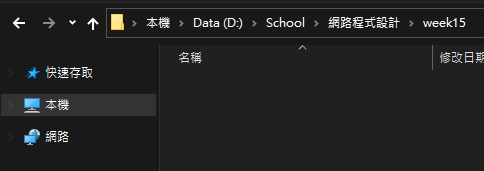
在这里开启终端机,并且开启 vscode
code .
新增一个档案 package.json 并且贴上以下程式码
{
  "name": "whiteboard",
  "version": "1.0.0",
  "description": "A simple collaborative whiteboard using socket.io",
  "main": "index.js",
  "keywords": [
    "socket.io",
    "whiteboard"
  ],
  "dependencies": {
    "express": "~4.17.1",
    "socket.io": "~2.3.0"
  },
  "scripts": {
    "start": "node index"
  },
  "author": "Damien Arrachequesne",
  "license": "MIT"
}
安装基本 npm 套件
npm install

建立一个资料夹 public
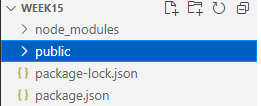
在 public 资料夹新增档案 index.html 以及 style.css 并且覆蓋以下程式码
<!doctype html>
<html lang="en">

<head>
    <meta charset="UTF-8">
    <title>Socket.IO whiteboard</title>
    <link rel="stylesheet" href="style.css">
</head>

<body>

    <canvas class="whiteboard"></canvas>

    <div class="colors">
        <div class="color black"></div>
        <div class="color red"></div>
        <div class="color green"></div>
        <div class="color blue"></div>
        <div class="color yellow"></div>
        <div class="drawtext">Text</div>
    </div>
    <script src="/socket.io/socket.io.js"></script>
    <script src="/main.js"></script>
</body>

</html>
/**
* Fix user-agent
*/
* {
box-sizing: border-box;
}
html, body {
height: 100%;
margin: 0;
padding: 0;
}
/**
* Canvas
*/
.whiteboard {
height: 100%;
width: 100%;
position: absolute;
left: 0;
right: 0;
bottom: 0;
top: 0;
}
.colors {
position: fixed;
border: 1px solid orange;
border-radius: 20px;
padding: 10px;
background-color:lightblue;
margin:10px;
}
.color {
height: 48px;
width: 48px;
border-radius: 50%;
margin-top: 10px;
border: 2px solid yellow;
}
.color.black { background-color: black; }
.color.red { background-color: red; }
.color.green { background-color: green; }
.color.blue { background-color: blue; }
.color.yellow { background-color: yellow; }
.drawtext {
height: 48px;
width: 48px;
margin-top: 10px;
border: 2px solid yellow;
border-radius: 50%;
text-align: center;
font-weight: 900;
}在根目录建立一个档案 index.js 并且覆蓋以下程式码
const express = require('express');
const app = express();
const http = require('http').Server(app);
const io = require('socket.io')(http);
const port = process.env.PORT || 3000;

app.use(express.static(__dirname + '/public'));

function onConnection(socket) {
    socket.on('drawing', (data) => socket.broadcast.emit('drawing', data));
    socket.on('texting', (data) => socket.broadcast.emit('texting', data));
}

io.on('connection', onConnection);

http.listen(port, () => console.log('listening on port ' + port));
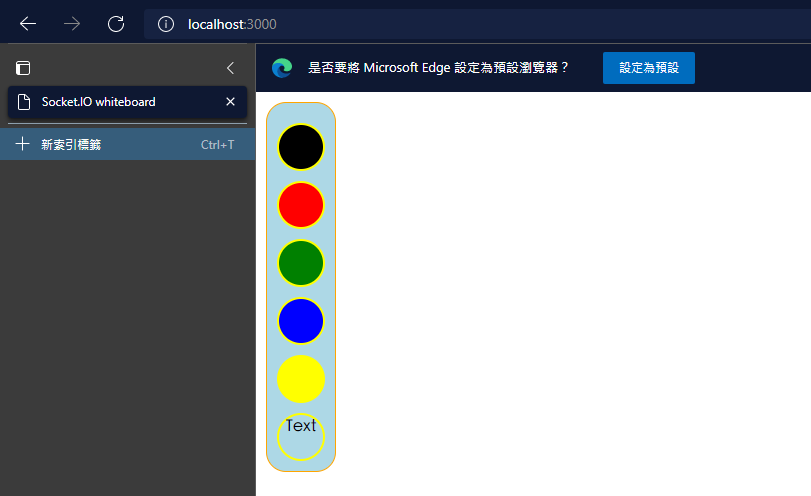
执行白板测试
node index.js
进入网址 http://localhost:3000/ 就可以看到白板了
在 public 资料夹里面新增一个档案 main.js 并且贴上以下程式码
'use strict';

(function () {

    var socket = io();
    var canvas = document.getElementsByClassName('whiteboard')[0];
    var colors = document.getElementsByClassName('color');
    var drawtext = document.getElementsByClassName('drawtext')[0];
    var context = canvas.getContext('2d');

    var current = {
        color: 'black'
    };
    var drawing = false;

    canvas.addEventListener('mousedown', onMouseDown, false);
    canvas.addEventListener('mouseup', onMouseUp, false);
    canvas.addEventListener('mouseout', onMouseUp, false);
    canvas.addEventListener('mousemove', throttle(onMouseMove, 10), false);
    //Touch support for mobile devices
    canvas.addEventListener('touchstart', onMouseDown, false);
    canvas.addEventListener('touchend', onMouseUp, false);
    canvas.addEventListener('touchcancel', onMouseUp, false);
    canvas.addEventListener('touchmove', throttle(onMouseMove, 10), false);

    for (var i = 0; i < colors.length; i++) {
        colors[i].addEventListener('click', onColorUpdate, false);
    }
    drawtext.addEventListener('click', onTextUpdate, false);
    function onTextUpdate(e) {
        socket.emit('texting', {
            text: "Hello World"
        });
    }

    socket.on('drawing', onDrawingEvent);
    socket.on('texting', onDrawingTextEvent);

    window.addEventListener('resize', onResize, false);
    onResize();

    function drawLine(x0, y0, x1, y1, color, emit) {
        context.beginPath();
        context.moveTo(x0, y0);
        context.lineTo(x1, y1);
        context.strokeStyle = color;
        context.lineWidth = 2;
        context.stroke();
        context.closePath();

        if (!emit) { return; }
        var w = canvas.width;
        var h = canvas.height;

        socket.emit('drawing', {
            x0: x0 / w,
            y0: y0 / h,
            x1: x1 / w,
            y1: y1 / h,
            color: color
        });
    }

    function onMouseDown(e) {
        drawing = true;
        current.x = e.clientX || e.touches[0].clientX;
        current.y = e.clientY || e.touches[0].clientY;
    }

    function onMouseUp(e) {
        if (!drawing) { return; }
        drawing = false;
        drawLine(current.x, current.y, e.clientX || e.touches[0].clientX, e.clientY || e.touches[0].clientY, current.color, true);
    }

    function onMouseMove(e) {
        if (!drawing) { return; }
        drawLine(current.x, current.y, e.clientX || e.touches[0].clientX, e.clientY || e.touches[0].clientY, current.color, true);
        current.x = e.clientX || e.touches[0].clientX;
        current.y = e.clientY || e.touches[0].clientY;
    }

    function onColorUpdate(e) {
        current.color = e.target.className.split(' ')[1];
    }

    // limit the number of events per second
    function throttle(callback, delay) {
        var previousCall = new Date().getTime();
        return function () {
            var time = new Date().getTime();

            if ((time - previousCall) >= delay) {
                previousCall = time;
                callback.apply(null, arguments);
            }
        };
    }

    function onDrawingEvent(data) {
        var w = canvas.width;
        var h = canvas.height;
        drawLine(data.x0 * w, data.y0 * h, data.x1 * w, data.y1 * h, data.color);
    }

    function onDrawingTextEvent(data) {
        console.log("drawing text");
        context.font = "30px Arial";
        context.fillText(data.text, 100, 100);
    }

    // make the canvas fill its parent
    function onResize() {
        canvas.width = window.innerWidth;
        canvas.height = window.innerHeight;
    }

})();
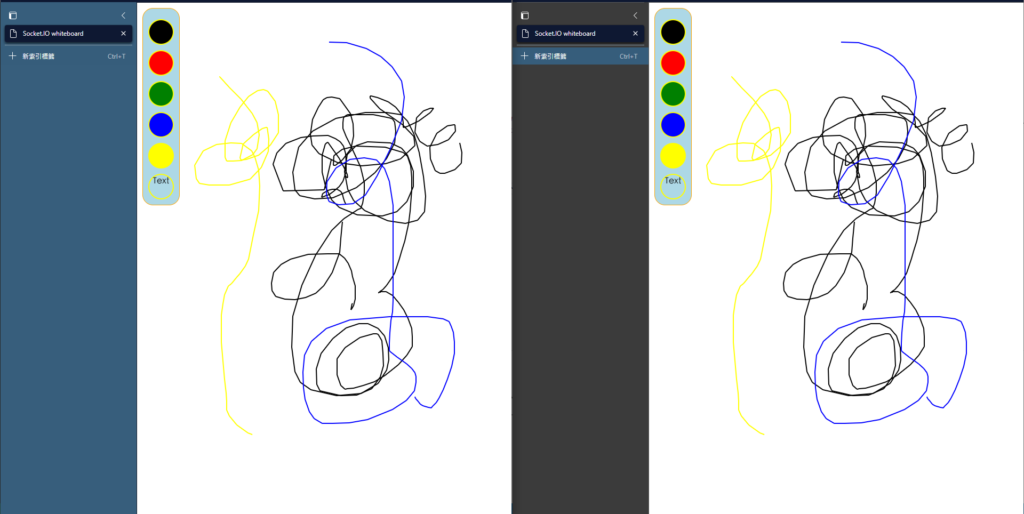
同时开启两个页面,上面的画面可以同步

资工系所硕二毕
-
车牌回来了
但是现在汽门漏气,维修ing...
-
车牌回来了
但是现在汽门漏气,维修ing...
Latest posts by SHXJ (see all)
- 受保护的内容: NAS 版 Mathbot 管理网站与 Linebot 启动方法 - 2024 年 11 月 15 日
- Realtime 啥鬼的 - 2021 年 6 月 15 日
- nodejs 数学游戏 - 2021 年 6 月 8 日