
建議先下載 VSCode <- 戳這直達 linux deb 版下載連結
善加利用這個按鈕

你會發現新大陸
下載完使用,切到下載目錄開啟終端機輸入以下指令
注意權限 ( 以下操作皆為普通使用者 )
sudo dpkg -i code(然後按tab)
裝完就OK了
切換目錄至 /opt/hadoop/etc/hadoop/
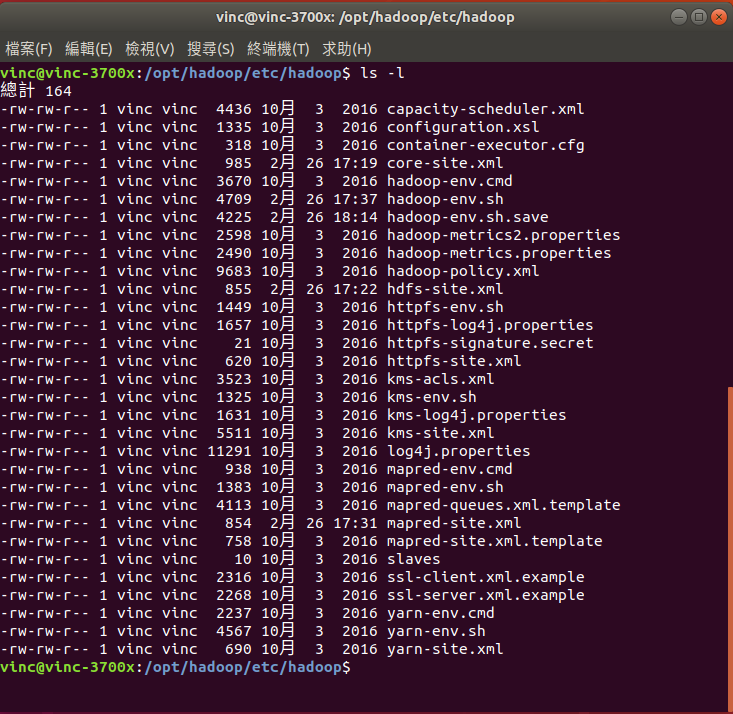
修改 hadoop-env.sh
終端機輸入
code hadoop-env.sh
可以直接貼上下方修改過的
# Licensed to the Apache Software Foundation (ASF) under one
# or more contributor license agreements.  See the NOTICE file
# distributed with this work for additional information
# regarding copyright ownership.  The ASF licenses this file
# to you under the Apache License, Version 2.0 (the
# "License"); you may not use this file except in compliance
# with the License.  You may obtain a copy of the License at
#
#     http://www.apache.org/licenses/LICENSE-2.0
#
# Unless required by applicable law or agreed to in writing, software
# distributed under the License is distributed on an "AS IS" BASIS,
# WITHOUT WARRANTIES OR CONDITIONS OF ANY KIND, either express or implied.
# See the License for the specific language governing permissions and
# limitations under the License.
# Set Hadoop-specific environment variables here.
# The only required environment variable is JAVA_HOME.  All others are
# optional.  When running a distributed configuration it is best to
# set JAVA_HOME in this file, so that it is correctly defined on
# remote nodes.
# The java implementation to use.
export JAVA_HOME=/usr/lib/jvm/java-8-openjdk-amd64
# The jsvc implementation to use. Jsvc is required to run secure datanodes
# that bind to privileged ports to provide authentication of data transfer
# protocol.  Jsvc is not required if SASL is configured for authentication of
# data transfer protocol using non-privileged ports.
#export JSVC_HOME=${JSVC_HOME}
export HADOOP_CONF_DIR=${HADOOP_CONF_DIR:-"/etc/hadoop"}
# Extra Java CLASSPATH elements.  Automatically insert capacity-scheduler.
#----2021/02/06
#for f in $HADOOP_HOME/contrib/capacity-scheduler/*.jar; do
#  if [ "$HADOOP_CLASSPATH" ]; then
#    export HADOOP_CLASSPATH=$HADOOP_CLASSPATH:$f
#  else
#    export HADOOP_CLASSPATH=$f
#  fi
#done
#------
# The maximum amount of heap to use, in MB. Default is 1000.
#export HADOOP_HEAPSIZE=
#export HADOOP_NAMENODE_INIT_HEAPSIZE=""
# Extra Java runtime options.  Empty by default.
export HADOOP_OPTS="$HADOOP_OPTS -Djava.library.path=$HADOOP_HOME/lib/native"
# Command specific options appended to HADOOP_OPTS when specified
export HADOOP_NAMENODE_OPTS="-Dhadoop.security.logger=${HADOOP_SECURITY_LOGGER:-INFO,RFAS} -Dhdfs.audit.logger=${HDFS_AUDIT_LOGGER:-INFO,NullAppender} $HADOOP_NAMENODE_OPTS"
export HADOOP_DATANODE_OPTS="-Dhadoop.security.logger=ERROR,RFAS $HADOOP_DATANODE_OPTS"
export HADOOP_SECONDARYNAMENODE_OPTS="-Dhadoop.security.logger=${HADOOP_SECURITY_LOGGER:-INFO,RFAS} -Dhdfs.audit.logger=${HDFS_AUDIT_LOGGER:-INFO,NullAppender} $HADOOP_SECONDARYNAMENODE_OPTS"
export HADOOP_NFS3_OPTS="$HADOOP_NFS3_OPTS"
export HADOOP_PORTMAP_OPTS="-Xmx512m $HADOOP_PORTMAP_OPTS"
# The following applies to multiple commands (fs, dfs, fsck, distcp etc)
export HADOOP_CLIENT_OPTS="-Xmx512m $HADOOP_CLIENT_OPTS"
#HADOOP_JAVA_PLATFORM_OPTS="-XX:-UsePerfData $HADOOP_JAVA_PLATFORM_OPTS"
# On secure datanodes, user to run the datanode as after dropping privileges.
# This **MUST** be uncommented to enable secure HDFS if using privileged ports
# to provide authentication of data transfer protocol.  This **MUST NOT** be
# defined if SASL is configured for authentication of data transfer protocol
# using non-privileged ports.
export HADOOP_SECURE_DN_USER=${HADOOP_SECURE_DN_USER}
# Where log files are stored.  $HADOOP_HOME/logs by default.
#export HADOOP_LOG_DIR=${HADOOP_LOG_DIR}/$USER
# Where log files are stored in the secure data environment.
export HADOOP_SECURE_DN_LOG_DIR=${HADOOP_LOG_DIR}/${HADOOP_HDFS_USER}
###
# HDFS Mover specific parameters
###
# Specify the JVM options to be used when starting the HDFS Mover.
# These options will be appended to the options specified as HADOOP_OPTS
# and therefore may override any similar flags set in HADOOP_OPTS
#
# export HADOOP_MOVER_OPTS=""
###
# Advanced Users Only!
###
# The directory where pid files are stored. /tmp by default.
# NOTE: this should be set to a directory that can only be written to by
#       the user that will run the hadoop daemons.  Otherwise there is the
#       potential for a symlink attack.
export HADOOP_PID_DIR=${HADOOP_PID_DIR}
export HADOOP_SECURE_DN_PID_DIR=${HADOOP_PID_DIR}
# A string representing this instance of hadoop. $USER by default.
export HADOOP_IDENT_STRING=$USER
export HADOOP_HOME=/opt/hadoop
export HADOOP_INTALL=$HADOOP_HOME
export HADOOP_MAPRED_HOME=$HADOOP_HOME
export HADOOP_COMMON_HOME=$HADOOP_HOME
export HADOOP_HDFS_HOME=$HADOOP_HOME
export YARN_HOME=$HADOOP_HOME
export HADOOP_COMMON_LIB_NATIVE_DIR=$HADOOP_HOME/lib/native
export PATH=$PATH:$HADOOP_HOME/bin:$HADOOP_HOME/sbin:$HBASE_HOME/bin
export HADOOP_CLASSPATH=$JAVA_HOME/lib/tools.jar
export HADOOP_PREFIX=/opt/hadoop
然後儲存就可以關掉 Vscode
修改 core-site.xml
終端機輸入
code core-site.xml
可以直接貼上下方修改過的
<?xml version="1.0" encoding="UTF-8"?>
<?xml-stylesheet type="text/xsl" href="configuration.xsl"?>
<!--
Licensed under the Apache License, Version 2.0 (the "License");
you may not use this file except in compliance with the License.
You may obtain a copy of the License at
http://www.apache.org/licenses/LICENSE-2.0
Unless required by applicable law or agreed to in writing, software
distributed under the License is distributed on an "AS IS" BASIS,
WITHOUT WARRANTIES OR CONDITIONS OF ANY KIND, either express or implied.
See the License for the specific language governing permissions and
limitations under the License. See accompanying LICENSE file.
-->
<!-- Put site-specific property overrides in this file. -->
<configuration>
<property>
<name>fs.default.name</name>
<value>hdfs://localhost:9000</value>
</property>
<property>
<name>hadoop.tmp.dir</name>
<value>/var/hadoop/hadoop-${user.name}</value>
</property>
</configuration>
然後儲存就可以關掉 Vscode
修改 hdfs-site.xml
終端機輸入
code hdfs-site.xml
可以直接貼上下方修改過的
<?xml version="1.0" encoding="UTF-8"?>
<?xml-stylesheet type="text/xsl" href="configuration.xsl"?>
<!--
Licensed under the Apache License, Version 2.0 (the "License");
you may not use this file except in compliance with the License.
You may obtain a copy of the License at
http://www.apache.org/licenses/LICENSE-2.0
Unless required by applicable law or agreed to in writing, software
distributed under the License is distributed on an "AS IS" BASIS,
WITHOUT WARRANTIES OR CONDITIONS OF ANY KIND, either express or implied.
See the License for the specific language governing permissions and
limitations under the License. See accompanying LICENSE file.
-->
<!-- Put site-specific property overrides in this file. -->
<configuration>
<property>
<name>dfs.replication</name>
<value>1</value>
</property>
</configuration>
然後儲存就可以關掉 Vscode
修改 mapred-site.xml
原檔以 mapred-site.xml.template 的模板方式存在
我又不想改原本的模板檔
複製一份 , 終端機輸入
cp mapred-site.xml.template mapred-site.xml
你會得到一份一模一樣的檔案
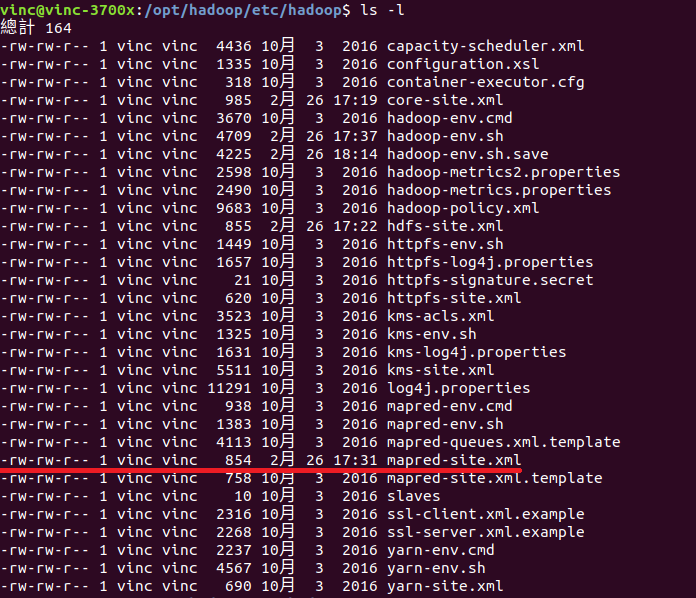
此時權限不一樣需修改回 ( -rw-rw-r–),終端機輸入
chmod 664 mapred-site.xml
先檢查權限是否為 -rw-rw-r– , 終端機輸入
ls -l
終端機輸入
code mapred-site.xml
可以直接貼上下方修改過的
<?xml version="1.0"?>
<?xml-stylesheet type="text/xsl" href="configuration.xsl"?>
<!--
Licensed under the Apache License, Version 2.0 (the "License");
you may not use this file except in compliance with the License.
You may obtain a copy of the License at
http://www.apache.org/licenses/LICENSE-2.0
Unless required by applicable law or agreed to in writing, software
distributed under the License is distributed on an "AS IS" BASIS,
WITHOUT WARRANTIES OR CONDITIONS OF ANY KIND, either express or implied.
See the License for the specific language governing permissions and
limitations under the License. See accompanying LICENSE file.
-->
<!-- Put site-specific property overrides in this file. -->
<configuration>
<property>
<name>mapred.job.tracker</name>
<value>localhost:9001</value>
</property>
</configuration>
然後儲存就可以關掉 Vscode
添加環境變數至 ~/.bashrc
終端機輸入 ( 用 echo 的方式添加至環境變數 , 減少出錯風險? )
echo 'export HADOOP_HOME=/opt/hadoop' >> ~/.bashrc
終端機輸入
echo 'export PATH=$PATH:$HADOOP_HOME/bin:$HADOOP_HOME/sbin:$HBASE_HOME/bin' >> ~/.bashrc
重新 source 一次
source ~/.bashrc
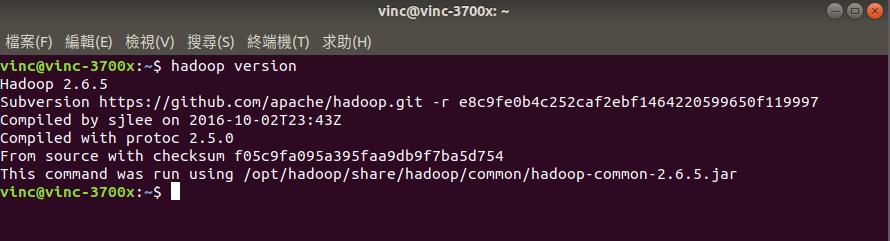
之後執行確認是否添加至環境變數內
hadoop version

沒事吃麥當勞,有事吃麥當勞
嘿嘿嘿
嘿嘿嘿
Latest posts by min (see all)
- Week 8 MongoDB Atlas & NodeJS - 2021 年 5 月 6 日
- C101特供 Hadoop 修改 - 2021 年 2 月 26 日
- Crucial Ballistix DDR4-3600 32GB 套條開箱 - 2020 年 11 月 13 日