
設定橋接網路介面
基本套件安裝
# apt-get install bridge-utils uml-utilities net-tools -y開機自動建立 br10 橋接介面 (考試的時候老師可能會指定不同名稱,要記得更改)
編輯 /etc/network/interfaces 檔案
# nano /etc/network/interfaces在最後面加入這些設定值 (XX 部分要替換為你自己的 IP)
auto br10
iface br10 inet static
address 192.168.10.1
netmask 255.255.255.0
gateway 120.117.72.XX
bridge_ports tap0
bridge_fd 9
bridge_hello 2
bridge_maxage 12
bridge_stp off
重新開機
# reboot查看一下有沒有正常載入
# ifconfig br10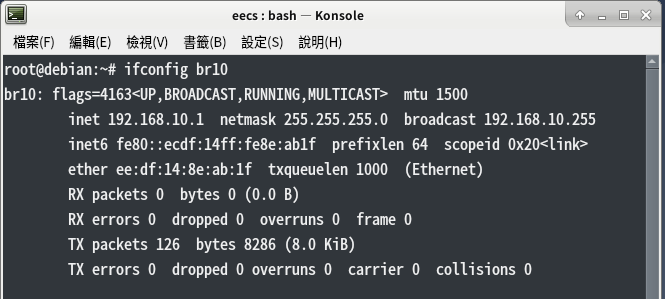
PING 看看他有沒有回應
# ping 192.168.10.1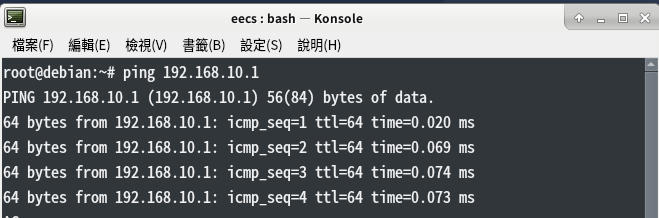
虛擬平台前置作業
核心原始碼、Das U-Boot 下載網址
練習這邊的版本都是以預設的為主、到時候老師會要求變更版本,請自己來這邊的網址抓
Kernel (核心)原始碼: https://www.kernel.org/
Das U-Boot 下載: ftp://ftp.denx.de/pub/u-boot/
下載基本檔案與建立環境
※重要※ 注意使用權限
在家目錄新增會用到的資料夾
$ cd
$ mkdir -p ~/virtualarm/kernel
$ mkdir -p ~/virtualarm/bootloader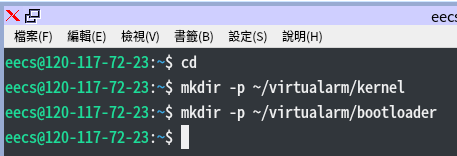
進入 virtualarm 資料夾
$ cd virtualarm分別下載核心原始碼、Das U-Boot 以及防火牆設定檔
$ wget https://cdn.kernel.org/pub/linux/kernel/v3.x/linux-3.16.81.tar.xz
$ wget ftp://ftp.denx.de/pub/u-boot/u-boot-2016.09.tar.bz2
$ wget https://debian.shxj.pw/rc.firewall
練習用可以用以下這兩個版本
kernel: $ wget https://cdn.kernel.org/pub/linux/kernel/v3.x/linux-3.16.85.tar.xz
uboot: $ wget ftp://ftp.denx.de/pub/u-boot/u-boot-2016.11.tar.bz2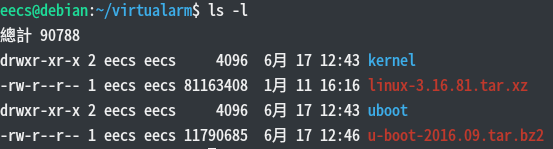
載入防火牆設定檔
$ su -
# cd ~eecs/virtualarm
# sh rc.firewall
資工系所碩二畢
-
車牌回來了
但是現在汽門漏氣,維修ing...
-
車牌回來了
但是現在汽門漏氣,維修ing...
Latest posts by SHXJ (see all)
- 受保護的內容: NAS 版 Mathbot 管理網站與 Linebot 啟動方法 - 2024 年 11 月 15 日
- Realtime 啥鬼的 - 2021 年 6 月 15 日
- nodejs 數學遊戲 - 2021 年 6 月 8 日